Download and Install MinGW and MSYS
-
Download the Automated MinGW Installer from sourceforge.net:
http://sourceforge.net/projects/mingw/
NOTE: During the writing of this procedure, the following Automated MinGW Installer was used:
mingw-get-inst-20101030.exe -
Run the Automated MinGW Installer.
NOTE: The Automated MinGW Installer does not require administrative rights. - Choose to download the latest repository catalogues.
-
Choose to install into a folder with no spaces in its path (i.e.
C:\MinGW). -
Select all components.
NOTE: At a minimum, select the C++ Compiler and MSYS Basic System in addition to the default C Compiler. -
Install the components.
NOTE: The latest repository catalogues will be downloaded and read. Then, the latest components will be downloaded and installed.
gcc and g++ was installed.Click here for detailed instructions on how to complete this step.
Download and Unzip the GLUT-for-Win32 Source Code
~~~~TODO~~~~
http://www.xmission.com/~nate/glut.html
During the writing of this procedure, the following source code was used:
http://www.xmission.com/~nate/glut/glut-3.7.6-src.zip
Click here for detailed instructions on how to complete this step.
Download the Makefile
~~~~TODO~~~~
Right click the following link and save the file:
makefile
Save the makefile to the root of the unzipped GLUT-for-Win32 folder (i.e. glut-3.7.6/ where the README is located).
Click here for detailed instructions on how to complete this step.
Make Two Modifications to the GLUT-for-Win32 Source Code
Make the following modifications:
-
Add the following lines to
include/GL/glut.hstarting at line 12:
										#ifdef __MINGW32__


										#define APIENTRY __stdcall


										#define CALLBACK __stdcall


										#endif
-
Comment out line 21 in
lib/glut/win32_winproc.cso that it reads:
//#include <crtdbg.h>
glut.h and win32_winproc.c should look like the following:
Click here for detailed instructions on how to complete this step.
Make the GLUT for Win32
~~~~TODO~~~~
In the MinGW Shell (also known as MSYS), cd to the root of the GLUT-for-Win32 folder (i.e. glut-3.7.6/ where the makefile was saved).
make
mingw32-make
This will make glut32.dll and libglut32.a.
Click here for detailed instructions on how to complete this step.
Install the GLUT for Win32
~~~~TODO~~~~
make install
mingw32-make install
This will install glut.h in /mingw/include/GL, glut32.dll in /mingw/bin, and libglut32.a in /mingw/lib.
Click here for detailed instructions on how to complete this step.
Test the GLUT for Win32
~~~~TODO~~~~
make test
mingw32-make test
This will build and run the gears program in
progs/mesademos/. The following window will be produced: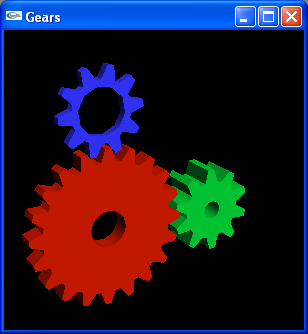
Click here for detailed instructions on how to complete this step.